Create with AI
🛠️ Tools You’ll Need
- chatgpt – https://labs.google/flow/about
- Flow – https://labs.google/fx/tools/flow
Step 1: Generate the Image
Prompts
Image 1

A cinematic ultra-realistic vertical 9:16 photograph of the Giza Pyramids and the Great Sphinx in Cairo, Egypt, captured during golden hour with a bright blue sky and a few soft white clouds. In the exact center foreground stands a massive freestanding object completely hidden beneath a luxurious deep crimson velvet unveiling cloth. The cloth is thick premium velvet with rich folds, elegant draping, realistic fabric texture, subtle floral jacquard pattern, and a glossy sheen reflecting warm sunlight. The covered structure sits perfectly on a circular stone platform surrounded by a low manicured green hedge.
The largest pyramid dominates the left background while the second pyramid appears behind it to the right. The Great Sphinx is clearly visible between them. A busy Cairo boulevard with realistic traffic, cars, palm trees, sidewalks, streetlights, and urban details fills the midground. The monument is perfectly centered and occupies approximately one-third of the frame height. The red cloth completely conceals the object beneath with no visible logo, edges, shape, or clues about what is underneath.
Premium commercial photography, monumental scale, hyper realistic, natural lighting, cinematic composition, HDR, ultra detailed, realistic shadows, physically accurate materials, 8K, sharp focus, depth of field, luxury unveiling event, symmetrical framing, professional architectural photography, no people, no text, no logos, no watermark.
Image 2
Use the first uploaded image ONLY as the environment and composition reference.
Use the second uploaded image ONLY as the exact logo reference.
Analyze the location image and preserve EVERYTHING exactly as it is:
– identical camera angle
– identical framing
– identical perspective
– identical lighting and golden hour atmosphere
– identical background
– identical road layout
– identical traffic
– identical palm trees
– identical Giza pyramids
– identical Great Sphinx
– identical circular platform with green hedge
– identical shadows
– identical scale and proportions
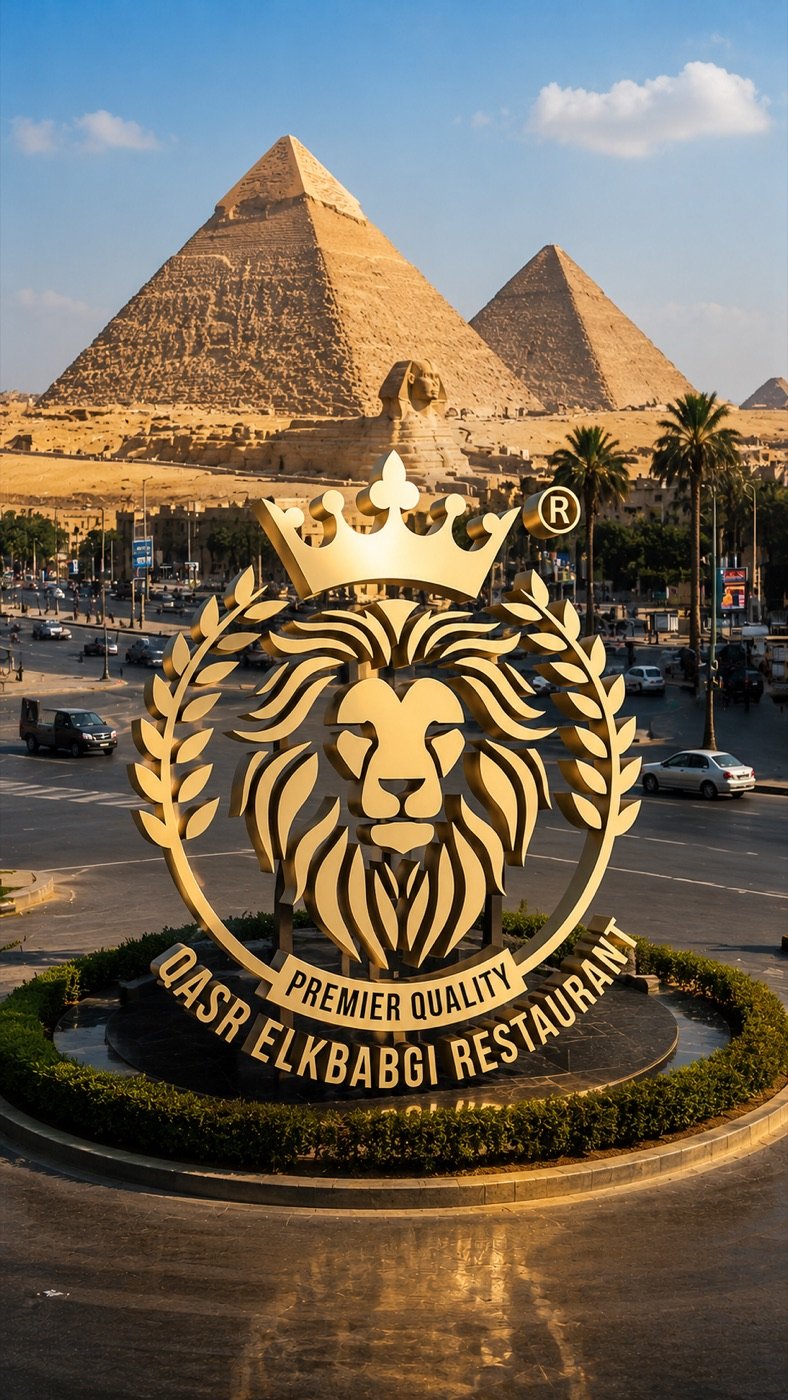
Replace ONLY the red unveiling cloth with a gigantic freestanding premium metallic 3D version of the uploaded logo.
The logo must be recreated with absolute accuracy:
– preserve every line
– preserve every curve
– preserve the lion face exactly
– preserve the crown exactly
– preserve the laurel wreath exactly
– preserve the circular frame exactly
– preserve the "PREMIER QUALITY" ribbon exactly
– preserve the text "QASR ELKBABGI RESTAURANT" exactly
– preserve the registered trademark symbol exactly
– do not redesign
– do not simplify
– do not change typography
– do not change spacing
– do not change proportions
Transform the flat logo into a luxury architectural monument made from brushed champagne gold metal with polished edges and realistic thickness (15–25 cm).
The logo stands vertically on the exact same circular black stone pedestal where the cloth was located.
The monument should appear as if permanently installed in the location, using physically accurate shadows, reflections, contact shadows, global illumination, realistic scale, and natural integration with the environment.
The monument occupies exactly the same footprint and approximate height as the covered object in the first image.
Ultra photorealistic.
Architectural visualization.
Commercial advertising quality.
HDR.
8K.
Extremely sharp.
Natural sunlight.
Physically based rendering.
Perfect perspective.
Museum-quality realism.
No people.
No extra objects.
No redesign.
No artistic interpretation.
No text changes.
No logo distortion.
The monument occupies exactly the same footprint and approximate height as the covered object in the first image.
Ultra photorealistic.
Architectural visualization.
Commercial advertising quality.
HDR.
8K.
Extremely sharp.
Natural sunlight.
Physically based rendering.
Perfect perspective.
Museum-quality realism.
No people.
No extra objects.
No redesign.
No artistic interpretation.
No text changes.
No logo distortion.
Step 2: Animate the flow
- Go to flow – https://labs.google/fx/tools/flow
- Select Video (or Frames to Video if available).
- Upload the image generated in Step 1
Then paste a prompt describing the animation.
Example Prompt
10 Seconds | Realistic Cloth Reveal
Animate ONLY the provided image.
This must be ONE SINGLE CONTINUOUS SHOT from start to finish.
NO transitions.
NO cuts.
NO scene changes.
NO dissolve.
NO fade in.
NO fade out.
NO morphing.
NO regeneration.
NO frame interpolation that changes the scene.
The input image is the master reference and must remain visually identical throughout the
entire video.
ABSOLUTE LOGO LOCK
The logo is the most important element.
DO NOT:
• redesign the logo
• recreate the logo
• regenerate the logo
• simplify the logo
• restyle the logo
• recolor the logo
• sharpen or soften the logo
• change its proportions
• change its thickness
• change its material
• change its texture
• change its reflections
• change its position
• change its scale
• change its orientation
• animate the logo
• rotate the logo
• bend the logo
• distort the logo
• replace any part of the logo
The logo must remain 100% pixel-identical to the input image after it is revealed.
The logo is completely rigid and permanently fixed to the ground.
Only the cloth and the environment are allowed to move.
The red luxury velvet cloth completely covers the logo at the beginning.
A gentle natural breeze slowly builds.
The cloth behaves with physically accurate fabric simulation:
• heavy velvet
• realistic folds
• natural gravity
• accurate wind interaction
• realistic inertia
• proper collision with the logo
• smooth sliding over edges
• premium cinematic cloth movement
The cloth slowly lifts from one corner, gracefully slides off the logo, and naturally flies away
out of frame.
The logo underneath never moves, never changes, and remains perfectly intact.
After the reveal, the camera continues its smooth motion while showcasing the logo.
Camera movement:
• slow cinematic dolly-in
• subtle left-to-right arc
• smooth stabilized gimbal movement
• natural parallax
• no zoom jumps
• no sudden movement
• no camera shake
Add only subtle environmental motion:
• leaves gently swaying
• grass moving softly
• tree branches reacting to the breeze
• slight cloud movement
• natural light shimmer
• realistic shadow movement
Everything else must remain unchanged.
Keep exactly the same:
• composition
• perspective
• buildings
• ground
• textures
• lighting direction
• color grading
• sky
• shadows
• reflections
Do not add or remove any objects.
Do not modify the architecture.
Do not alter the environment.
The final result must look like a real continuous cinematic shot captured in-camera, not an
AI-generated transformation.
Duration: 10 seconds
One seamless take
Ultra photorealistic
8K
24 fps
PBR
Global illumination
Realistic cloth physics
Natural wind simulation
Credits
- Click Generate .